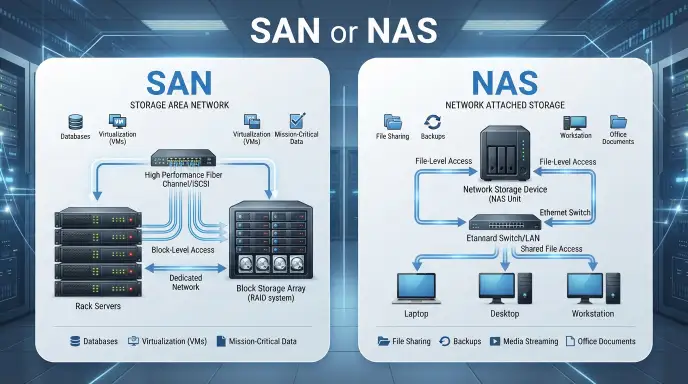
SAN and NAS are different network storage technologies: SAN provides blockiflevel storage, while NAS provides fileiflevel storage. Both help users store, manage, and access data across a network.
People often search for “SAN or NAS” because the two terms look similar and solve related storage problems. The main difference is how they give data to computers. A SAN presents storage as blocks that servers can use like disks. A NAS provides files and folders over a network.
This difference matters when choosing storage for a home, office, database, virtual machines, or large business system. NAS is commonly used for file sharing, backups, and shared folders. SAN is often used where applications need block storage, high performance, and lowiflatency access.
The words are not spelling variations. SAN means Storage Area Network, while NAS means Network Attached Storage. Their names are simply different acronyms for different storage models.
Quick Answer san or nas
SAN means Storage Area Network. It provides blockiflevel storage to servers and is commonly used for demanding workloads such as databases and virtualization.
NAS means Network Attached Storage. It provides fileiflevel storage over a network and is commonly used for file sharing, backups, collaboration, and general storage.
Example:
- SAN: A server sees a storage volume similar to a local disk.
- NAS: A user opens a shared folder containing documents and files.
So, the simple difference is:
SAN = block storage
NAS = file storage
Definition and Meaning of SAN or NAS
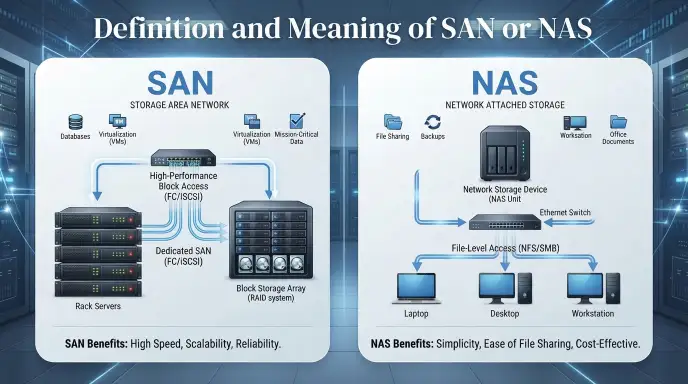
What Does SAN Mean?
SAN stands for Storage Area Network.
A SAN is a dedicated storage network that connects servers with shared storage. It normally provides blockiflevel access. The operating system or server manages the file system on the storage volume.
SAN technology is often used for:
- Databases
- Virtual machines
- Enterprise applications
- Highifperformance workloads
- Large business storage systems
What Does NAS Mean?
NAS stands for Network Attached Storage.
A NAS device connects to a network and provides files and folders to users or applications. It manages fileiflevel storage and is commonly accessed through standard network connections.
NAS is often used for:
- File sharing
- Office documents
- Photos and videos
- Backups
- Team collaboration
- Home media storage
Why Are SAN and NAS Confused?
SAN and NAS are confused because both provide shared network storage. However, they work at different storage levels.
A SAN focuses on blocks, while a NAS focuses on files.
The Origin of SAN or NAS
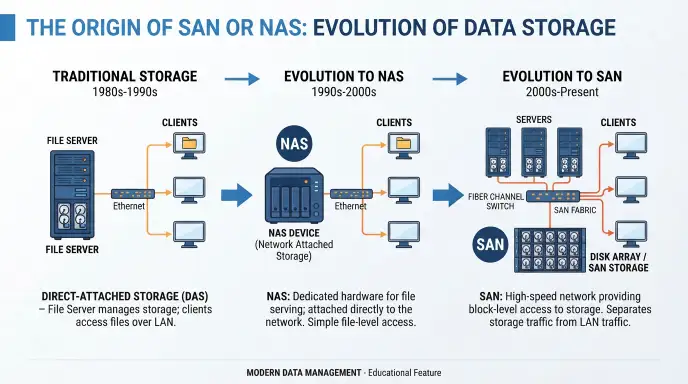
SAN and NAS are technical acronyms rather than alternative spellings.
SAN comes from Storage Area Network.
NAS comes from Network Attached Storage.
The two terms developed around different ways of making storage available across networks. SAN technology is built around shared block storage, while NAS is built around file sharing.
The similar letter pattern can cause confusion. SAN uses the letters from Storage Area Network, while NAS uses the letters from Network Attached Storage.
The terms can also appear together because organizations may use both technologies in the same environment.
British English vs American English Spelling
SAN and NAS do not have different British and American spellings. They are technical acronyms, and the same forms are normally used in both varieties of English.
| Term | Full Form | British English | American English |
| SAN | Storage Area Network | SAN | SAN |
| NAS | Network Attached Storage | NAS | NAS |
| Storage | Storage | Storage | Storage |
| Network | Network | Network | Network |
| Attached | Attached | Attached | Attached |
The main point is simple: SAN and NAS remain the same in British and American English.
For technical writing, keep the acronyms in capital letters and explain the full form when the term first appears.
Which Spelling Should You Use?
There is no USifversusifUK spelling choice for SAN or NAS.
Use SAN when you mean Storage Area Network.
Use NAS when you mean Network Attached Storage.
For a global audience, write the full term the first time:
Storage Area Network (SAN)
Network Attached Storage (NAS)
After that, you can use SAN and NAS alone.
This approach is clear for readers in the United States, United Kingdom, Canada, Australia, and other Englishifspeaking markets.
Common Mistakes with SAN or NAS
Mistake 1: Treating SAN and NAS as the Same Thing
Incorrect: “SAN and NAS are just two names for the same storage.”
Correct: They are different storage technologies with different access models.
Mistake 2: Mixing Up the Acronyms
Incorrect: “NAS means Storage Area Network.”
Correct: NAS means Network Attached Storage.
Mistake 3: Saying NAS Always Means One Specific Device
A NAS can refer to a storage system that provides file access over a network. Modern storage platforms can also support multiple storage functions.
Mistake 4: Assuming SAN Always Uses One Connection Type
SAN environments can use different technologies and protocols. Fibre Channel and iSCSI are common examples, while modern environments may use other approaches.
Mistake 5: Thinking the Words Have Different Spellings
SAN and NAS are not spelling variants. They are different acronyms with different meanings.
SAN or NAS in Everyday Examples
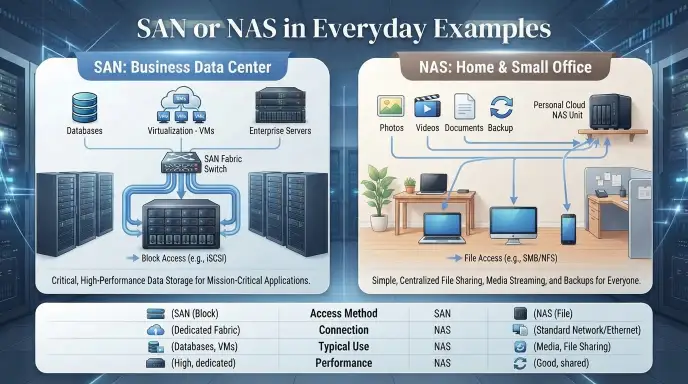
In an Email
SAN example:
“The database servers will use SAN storage for the new application.”
NAS example:
“Please save the project files to the shared NAS folder.”
In News or Technology Articles
A technology article may say:
“The company expanded its SAN infrastructure to support enterprise applications.”
Another article may say:
“The office uses NAS storage for backups and shared files.”
On Social Media
A technology user might write:
“I use NAS storage to back up my photos.”
An IT professional might write:
“Our servers connect to SAN storage for database workloads.”
In Formal Writing
For formal writing, introduce the full term first:
“The company deployed a Network Attached Storage (NAS) system for centralized file sharing.”
Then use NAS throughout the rest of the document.
SAN or NAS : Google Trends & Usage Data
Search interest around SAN and NAS is mainly connected with computer storage, networking, enterprise IT, backups, servers, and data management.
The terms are used internationally, so their technical meanings do not change between countries. Search behavior can vary by audience. Enterprise IT users are more likely to search for topics such as SAN vs NAS, storage architecture, performance, and virtualization. Home and smallifbusiness users often search for NAS in connection with backups, media storage, file sharing, and personal clouds.
Exact Google Trends numbers can change over time and depend on the selected country, date range, and search category. Therefore, it is better to treat Trends data as a measure of search interest rather than a measure of technical quality.
The most common search intent behind “SAN or NAS” is usually comparison: users want to understand the difference and identify which architecture fits a particular workload.
SAN vs NAS Comparison Table
| Feature | SAN | NAS |
| Full form | Storage Area Network | Network Attached Storage |
| Storage type | Blockiflevel | Fileiflevel |
| Main purpose | Shared block storage | Shared file storage |
| Common users | Enterprise IT teams | Home users, teams, businesses |
| Common workloads | Databases, virtualization | Files, backups, media |
| Management | More specialized | Generally simpler |
| Network | Often dedicated storage fabric or highifspeed network | Commonly Ethernet |
| Access | Servers access storage blocks | Users/apps access files |
| Complexity | Generally higher | Generally simpler |
| Typical use | Enterprise applications | File sharing and backup |
SAN and NAS can also be combined in some storage environments, so they are not always mutually exclusive choices.
FAQs About SAN or NAS
Q1. Which is better, NAS or SAN?
Neither is universally better; NAS is usually suited to shared files, while SAN is designed for highifperformance block storage.
Q2. Is block storage SAN or NAS?
SAN typically provides blockiflevel storage, while NAS generally provides fileiflevel storage through SMB or NFS.
Q3. Is a NAS generally cheaper than a SAN?
Yes, NAS is generally cheaper to deploy and manage than SAN, especially for small and mediumifsized storage needs.
Q4. Can a NAS replace iCloud?
Yes, a NAS can replace some iCloud functions by storing and syncing files, photos, and backups, but it requires your own hardware and setup.
Q5. What are the disadvantages of NAS?
NAS can require upfront hardware costs, maintenance, technical setup, and protection against drive failure, theft, or unauthorized access.
Q6. How long will a NAS drive last?
A NAS hard drive commonly lasts around 3–5 years, but its actual lifespan depends on workload, operating conditions, and drive quality.
Q7. Can NAS work without internet?
Yes, a NAS can work without the internet on your local network, allowing devices in your home or office to access stored files.
Q8. Can a NAS drive be hacked?
Yes, a NAS can be hacked if it is poorly secured or exposed to the internet, so strong passwords, updates, and access controls are important.
Conclusion
SAN and NAS are two important network storage technologies, but they are not the same. SAN means Storage Area Network, while NAS means Network Attached Storage. The biggest difference is how they provide access to stored data.
SAN provides blockiflevel storage and is commonly used for demanding server workloads, databases, virtualization, and enterprise applications. NAS provides fileiflevel storage and is widely used for shared folders, backups, documents, photos, and media.
There is also no British or American spelling difference between SAN and NAS. The acronyms stay the same in both forms of English.
When writing for a general audience, introduce each acronym with its full name. This makes the meaning clear and avoids confusion. If the topic is file sharing, NAS is the relevant term. If the topic involves block storage for servers and specialized enterprise workloads, SAN is the relevant term.
Understanding this basic difference makes “SAN or NAS” much easier to understand and use correctly in technical writing.

I’m James Mitchell, an English language and grammar writer at Grammwise. I enjoy helping readers understand confusing words, spelling differences, grammar rules, and everyday English usage. My goal is to make English simple, clear, and easy to use with practical examples and straightforward explanations.








1 thought on “SAN or NAS: Key Differences, Uses, and Benefits”